
Weebly Site Manager Extension
Overview
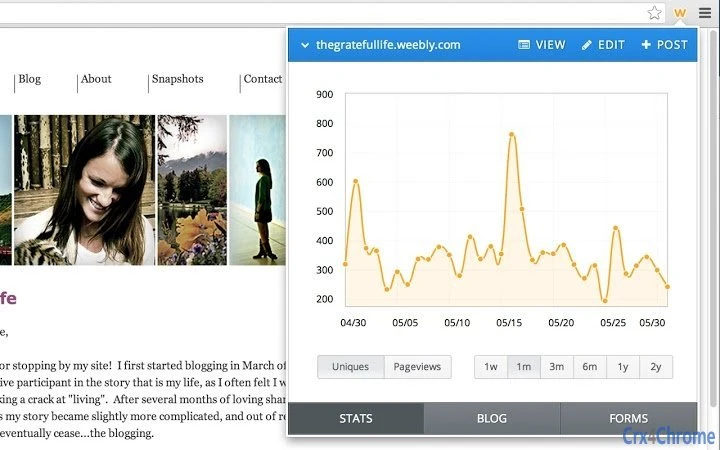
The Weebly Site Manager Extension is a browser-based tool designed to streamline website management for users of the Weebly platform. By integrating directly into the browser, it enables real-time access to key site functions without requiring users to navigate away from their current workflow. The extension supports tracking page views and unique visitors, viewing and responding to blog comments, replying to contact form messages, and making on-the-fly edits to site content and blog posts. This functionality is particularly useful for content creators, small business owners, and bloggers who manage their online presence across multiple devices.
Target users include individuals and teams who rely on Weebly to maintain websites, blogs, or online stores and need quick access to performance metrics and user interactions. The extension aims to reduce the time spent switching between tabs or logging into the Weebly dashboard by centralizing essential tools in the browser toolbar. Its design reflects a focus on simplicity and efficiency, aligning with Weebly’s broader mission of making website creation and management accessible to non-technical users.
The developer did not provide additional details about the company or development background. Platform compatibility includes Windows, Mac, and Linux, suggesting broad accessibility across major desktop operating systems. Real-world usage scenarios include monitoring traffic during a product launch, responding promptly to customer inquiries via contact forms, or publishing timely blog updates directly from a research session.
Key Features & Capabilities
- Real-time Analytics Access – Instantly view page views and unique visitor counts for your Weebly site, enabling data-driven decisions without leaving your current browser tab.
- Blog Comment Management – See all incoming blog comments directly through the extension and respond with a single click, improving engagement and content interaction.
- Contact Form Response Tool – Receive notifications for new messages from contact forms and reply directly through the extension, reducing response time and enhancing user experience.
- On-the-Go Content Editing – Make immediate edits to your site’s content or draft new blog posts without navigating to the full Weebly dashboard, ideal for quick updates.
- Seamless Browser Integration – Designed to work within the browser environment, minimizing workflow disruption and supporting multitasking across research, writing, and site management.
These features are especially beneficial for users managing multiple projects or operating in fast-paced environments where timely responses and content updates are critical. The ability to monitor site traffic while browsing or writing content helps maintain consistent engagement with audiences. For example, a blogger can check visitor trends during a writing session and adjust content strategy in real time.
User Interface, Workflow & Performance
The extension presents a clean, minimal interface accessible via a browser icon, designed to reduce visual clutter while delivering essential functions. Navigation is straightforward, with a dropdown or inline panel that displays key metrics and action buttons. Users can access analytics, comments, messages, and editing tools with minimal clicks, promoting efficiency.
Workflow integration is optimized for users who frequently switch between research, content creation, and site updates. The extension allows for quick actions without requiring full page reloads or additional authentication steps after initial setup. Performance is expected to remain stable given the lightweight nature of the tool, though exact resource usage details were not specified.
The developer did not specify resource usage details, including CPU or RAM behavior. However, based on the file size of 1.2 MB and the nature of browser extensions, it is likely to have minimal impact on system performance. Stability appears to be a priority, as the extension operates within the secure sandbox of the browser environment. No reports of crashes or conflicts were mentioned in the provided information.
Compatibility & System Requirements
The Weebly Site Manager Extension is compatible with Windows, Mac, and Linux operating systems, supporting a wide range of desktop environments. It is designed to function within major web browsers, though specific browser names were not listed. The installation size is 1.2 MB, indicating a lightweight footprint that should not significantly affect storage or system performance.
Exact system requirements were not listed, so users should ensure their operating system and browser are up to date for optimal functionality. Hardware requirements are not specified, but the extension’s small size and browser-based nature suggest it will run efficiently on standard desktop configurations. Compatibility information is limited to the operating systems mentioned, with no details on older or less common platforms.
Pros and Cons
Pros
- Lightweight at just 1.2 MB, ensuring minimal system impact.
- Direct access to site analytics, comments, and messages from the browser.
- Supports cross-platform use across Windows, Mac, and Linux.
- Enables quick content edits and blog posts without full dashboard access.
- Completely free to use, with no hidden costs or subscription tiers.
Cons
- Exact browser compatibility details were not provided.
- Performance and resource usage were not officially documented.
- No offline functionality was mentioned.
- Advanced features may be limited compared to the full Weebly dashboard.
- Dependent on internet connectivity for all operations.
FAQ Section
Is the Weebly Site Manager Extension free to use?
Yes, the extension is available at no cost. There are no subscription fees or premium tiers required to access its core features.
Which operating systems does the extension support?
The extension is compatible with Windows, Mac, and Linux, allowing users across major desktop platforms to manage their Weebly sites efficiently.
Does the extension work offline?
Due to its reliance on real-time data and web-based functions, the extension requires an active internet connection to operate. Offline use is not supported.
How often does the extension update?
Update frequency is not specified. Users are advised to keep their browser and extension manager current to ensure compatibility and security.
Is my data secure when using the extension?
The extension operates within the browser’s security framework and accesses Weebly data through authenticated connections. No specific security measures were detailed, but it is designed to follow standard web security practices.
Final Thoughts
The Weebly Site Manager Extension delivers a practical, no-frills solution for users who need fast access to essential website management tools. Its lightweight design, cross-platform support, and seamless browser integration make it a valuable asset for bloggers, small business owners, and online store operators. While detailed performance data and advanced features are not available, the extension fulfills its core purpose effectively.
For individuals seeking to manage their Weebly sites without constant dashboard switching, this tool offers a streamlined workflow. The absence of cost and broad OS compatibility further enhance its appeal. It is especially suited for users who prioritize efficiency and real-time responsiveness.
Download Weebly Site Manager Extension now







